No products in the cart.
Return To ShopLCD
- Uses a backlight
- Multiple display layers
- Good brightness
- Blacks can appear grey

No products in the cart.
Return To ShopWhat are you actually paying for?
Two replacement screens can fit the same phone, but they work in different ways. This guide explains the real differences between LCD and OLED, what you'll notice in everyday use, and which option makes the most sense for your device, budget and expectations.
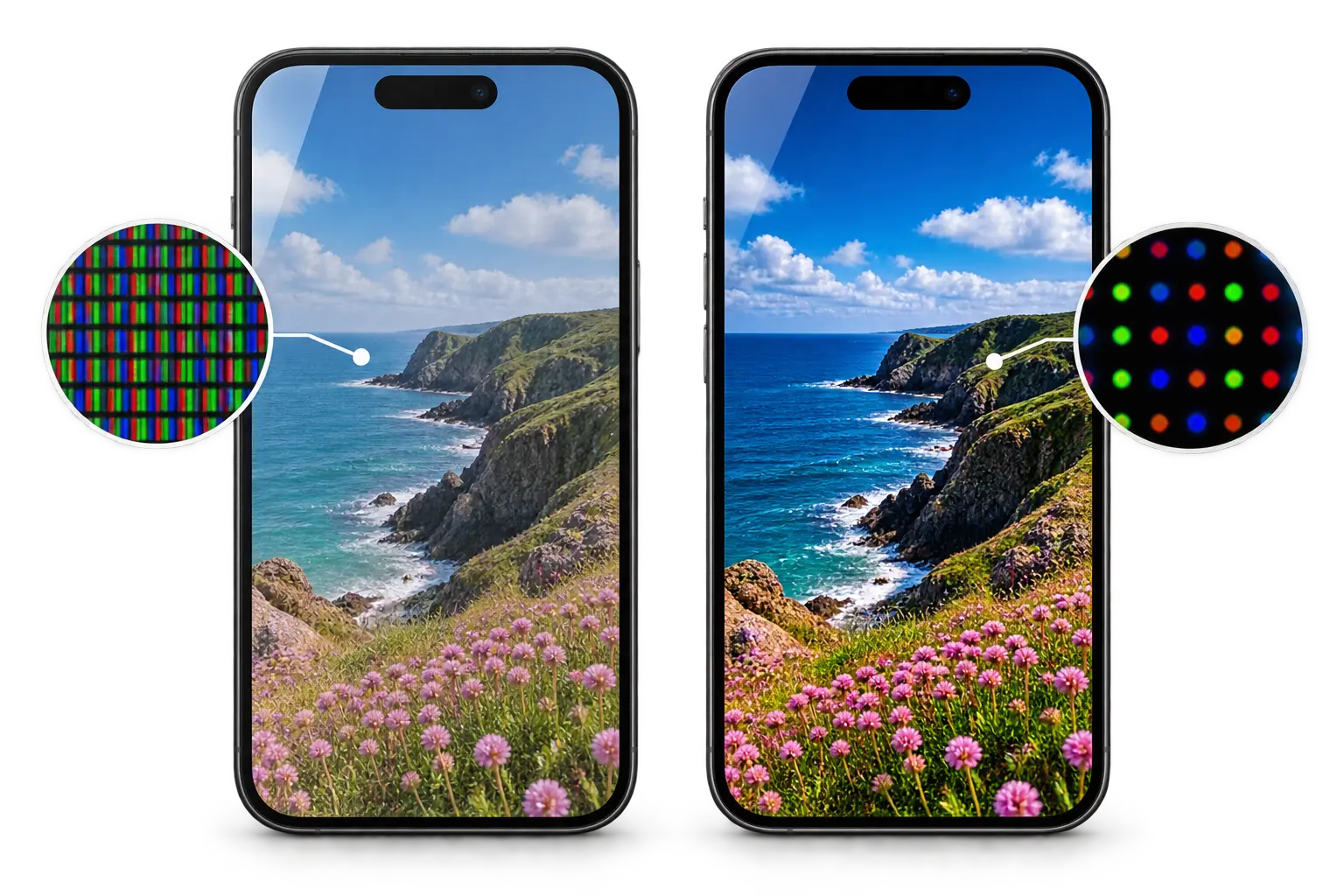
The biggest difference is how the screen creates light. An LCD needs a separate backlight behind the display. With OLED, the individual pixels produce their own light. That one difference changes how blacks, contrast and dark scenes can look.
An LCD uses a backlight that shines through the display layers. The liquid-crystal layer controls how much of that light passes through each pixel to create the image.
OLED does not need a conventional backlight. Each OLED pixel emits its own light and can be individually controlled. A pixel displaying black can switch off, producing much deeper blacks.
Many newer iPhones were designed around an OLED display. Compatible aftermarket LCD screens are available for some models and can reduce the repair cost. However, an LCD conversion does not reproduce the same display technology, and the differences can go beyond colour and contrast.
With OLED, individual pixels produce their own light. A good-quality OLED replacement keeps that fundamental display technology. An LCD conversion introduces a separate backlight and a different display construction.
An LCD replacement can still provide a perfectly usable screen on a compatible iPhone. For an older handset, or where keeping the repair cost down is the priority, that may be a reasonable choice.
If you want the replacement to behave more like the display Apple originally designed the phone to use, a good-quality OLED is normally the more appropriate option.
Not every difference will be equally noticeable to every user, and replacement-screen quality matters too.
OLED pixels can switch off when displaying black. An LCD relies on its backlight, so blacks can appear more grey and dark scenes may have noticeably less contrast.
OLED can reduce display power use with darker content because individual pixels can dim or switch off. An LCD needs its backlight while the display is illuminated, so an LCD conversion can use more display power in some situations.
On supported iPhones, Always-On Display is designed to work with OLED's pixel-level light control alongside a very low display refresh rate. LCD cannot reproduce the same pixel-level behaviour, so it is not an equivalent choice where efficient Always-On Display use matters.
Some lower-cost aftermarket LCD assemblies can feel slightly less responsive or show a small amount of touch lag compared with the original screen or a good OLED replacement. The quality of the display and digitiser is a major factor here.
An LCD needs a backlight and additional display layers. Aftermarket LCD assemblies can therefore differ in thickness and construction from the OLED assembly the iPhone was originally designed to use. Brightness, colour and viewing characteristics can also vary between replacement panels.
Touch lag, poor colour, low brightness or inconsistent performance can also result from the quality of the replacement part itself. LCD does not automatically mean poor quality, just as a screen described as OLED is not automatically a high-quality OLED.
It can be, particularly if the iPhone is older and keeping the repair cost down matters more than retaining its original display technology. If display quality, OLED characteristics and a closer match to the original screen matter more, a good-quality OLED is usually the better fit. There is another important question, though: not all replacement OLED screens are the same.
Two replacement iPhone screens can both be sold as OLED while being constructed differently. Both use self-emitting pixels, but the material supporting the display is different. That distinction matters when comparing aftermarket iPhone screens.
“Hard” and “soft” do not describe the outer glass or whether the screen feels soft. Hard OLED uses a rigid glass substrate beneath the display. Soft OLED uses a flexible substrate, typically plastic-based.
Hard OLED gives you the fundamental benefits of OLED, including self-emitting pixels, true blacks and strong contrast. Its key difference is the rigid substrate supporting the display.
A solid base supports the OLED display layer.
A rigid OLED substrate is generally less tolerant of flexing and physical stress. Internal panel damage can occur after an impact even when the outer glass is not badly broken.
Soft OLED also uses self-emitting pixels, but places the display on a flexible substrate. This construction is generally closer to the flexible OLED approach used in many original OLED iPhone displays.
The supporting layer can flex rather than behaving like a rigid sheet of glass.
Its flexible construction is generally more tolerant of physical stress than hard OLED while retaining the display characteristics expected from OLED technology.
The difference is not simply that one screen has a good picture and the other does not. Both can look good. Construction, manufacturing quality and the grade of the finished panel all matter.
Each technology uses self-emitting pixels, so neither requires the constantly illuminated backlight used by LCD.
The flexible substrate gives the display assembly greater tolerance to flexing and physical stress than a rigid hard OLED panel.
Brightness, colour accuracy, touch performance and manufacturing consistency can differ between replacement-screen manufacturers.
Two Soft OLED screens can still differ in brightness, colour accuracy, touch response, electronics and manufacturing consistency. The underlying OLED construction matters, but so does the quality of the finished replacement screen.
There isn't one answer for every iPhone or every customer. The right screen depends on what the phone was designed to use, how you use it, how long you plan to keep it and what you want to spend. The important thing is knowing what you're actually being offered.
Price matters, but it shouldn't be the only information you're given. Screen technology affects the way the phone looks and behaves every day, so it is worth understanding the compromise before choosing.
LCD can reduce the cost of repairing an iPhone, including some models originally designed around OLED. It can be a practical budget option, but it does not reproduce OLED technology.
For an OLED iPhone, Soft OLED keeps the same fundamental display technology and uses a flexible substrate rather than the rigid construction found in Hard OLED.
Where a genuine manufacturer screen is available, this keeps the repair closest to the display specification intended for the device.
An LCD replacement can make an OLED iPhone usable again for less money, but it changes the display technology the phone is using. If retaining the characteristics of the original display matters to you, an appropriate OLED replacement is the more natural choice.
These are often more useful than simply asking for the cheapest screen replacement available.
Knowing whether the device was designed around LCD or OLED gives you the right starting point.
“Aftermarket screen” or even simply “OLED” doesn't tell you enough to compare two repair quotes properly.
Spending more on the display may make more sense on a device you expect to use every day for another two or three years.
There is nothing wrong with choosing around a budget — provided the differences are explained clearly before the repair.
This LCD-versus-aftermarket-OLED discussion is mainly relevant to the iPhone repairs covered by this guide. For our Samsung and Google Pixel screen repairs, FoneFix Honiton uses genuine manufacturer parts rather than offering aftermarket LCD or OLED screen grades.
LCD or OLED is only part of the answer. A screen is something you look at and interact with hundreds of times a day, so brightness, colour, touch response and manufacturing quality can matter just as much as the technology printed on the box.
Ideally, you shouldn't spend your day thinking about the replacement screen. Touch should feel predictable, text should remain clear and the display should behave consistently as you move between apps, photographs, video and normal phone use.
A good replacement should provide useful brightness across normal conditions. Poorer displays can look acceptable indoors yet become noticeably harder to read in bright daylight.
Colours should look balanced rather than unnaturally cold, warm or oversaturated. On OLED, properly switched-off pixels also produce the true black levels that distinguish the technology from LCD.
Swiping, typing and scrolling should feel immediate and consistent. Poor-quality replacement assemblies can sometimes introduce less precise or less responsive touch behaviour.
The image should remain usable when the phone isn't being viewed perfectly straight-on. Lower-quality displays may show more noticeable changes in brightness, contrast or colour when viewed from an angle.
Screen quality is not only about the panel. The complete assembly also needs accurate dimensions, sensible bezel proportions and consistent manufacturing so that it fits and functions correctly.
An OLED screen is not automatically a high-quality screen simply because it uses OLED technology. Likewise, a well-made LCD can be a perfectly sensible replacement where LCD is appropriate. The technology, construction and manufacturing quality all need to be considered together.
Replacement screens are not all made the same. Differences in display technology, construction, components and manufacturing quality can affect how a screen looks and feels. However, a symptom after a repair does not automatically mean the replacement screen is poor quality. The cause needs to be considered properly.
Poor-quality replacement screens can certainly cause problems. However, an iPhone can also occasionally behave differently simply because an aftermarket display is not the original Apple component. Installation, previous or subsequent damage, connections and faults elsewhere in the phone can also produce symptoms that appear screen-related.
The key point: a touch or display issue after a repair should be diagnosed properly rather than automatically being treated as proof of a poor-quality replacement screen.
Some differences are characteristics of the replacement technology. Others may indicate a fault. The symptom alone does not always tell you which is which.
Poor-quality displays can suffer from inaccurate, delayed or inconsistent touch, but quality is not the only possible cause. An iPhone can occasionally behave differently with an aftermarket display simply because it is not the original Apple component. A high-quality OLED will normally perform very well, but an occasional touch issue does not automatically prove that a poor-quality screen has been fitted.
Different replacement panels can have different maximum brightness levels and brightness consistency. A screen may look perfectly good indoors but be less visible in strong daylight. That can be a characteristic of the particular replacement panel rather than evidence that the screen is faulty.
Whites can appear slightly warmer or cooler and colour reproduction may differ from the original Apple display. An LCD fitted to a phone designed for OLED creates a much more fundamental difference because LCD cannot reproduce OLED's pixel-level black and requires a backlight.
Lines, flashing, black areas or unusual colours mean something needs investigating. A defective display assembly can cause these symptoms, but physical damage, connections or another device fault can produce display problems too. The symptom itself does not identify the cause.
Replacement assemblies can differ in thickness, bezel dimensions, flexibility and manufacturing tolerances. Better replacement parts should fit correctly and feel appropriate for the device, whereas very cheap assemblies can make compromises more noticeable. This is one reason why simply describing every aftermarket display as being the same is misleading.
In this situation, the phone isn't simply receiving a different grade of OLED. It is being fitted with a different display technology. LCD uses a continuously illuminated backlight, so its power behaviour, black levels and contrast differ from the OLED display the phone was designed around. On supported models with features such as an Always-On display, retaining OLED technology is particularly important.
No. Face ID uses separate components within Apple's TrueDepth camera system. Replacing the display does not, by itself, require Face ID to stop working. However, the components around the top of the display are delicate, so careful handling, transfer and correct reassembly remain important during a screen repair.
Customers often have questions that go beyond LCD and OLED. Will Face ID still work? What happens to your photographs and apps? Can you update iOS afterwards? Here are straightforward answers to some of the questions we hear most often.
Face ID relies on components within Apple's TrueDepth camera system rather than the display panel itself. During a screen repair, however, delicate components around the upper display area may need to be handled or transferred depending on the model and repair method. Correct handling and reassembly are therefore important.
Select a question to see the answer. Some behaviour varies by iPhone generation, replacement part and iOS version.
Normally, replacing the display does not require the phone's stored data to be erased. Your photographs, messages, apps and settings are stored elsewhere in the device. As with any electronic device, keeping a current backup is sensible before repair whenever possible.
A screen replacement does not normally prevent an iPhone from receiving or installing iOS updates. The display and the operating-system update process are separate issues.
This depends on the iPhone, replacement display and repair process. Historically, retaining True Tone on many models could require display information to be transferred or correctly configured. Apple has also changed parts and repair behaviour over time, so True Tone should not be treated as a universal yes-or-no rule across every iPhone generation.
Some iPhone generations can display information about a replaced part within Settings or during the period following repair. Exactly what appears can depend on the model, iOS version, part fitted and whether Apple's supported configuration or repair processes are available and completed.
Opening an iPhone disturbs the original display seal. A replacement seal can be fitted during reassembly, but a repaired phone should not be represented as having its original factory water resistance guaranteed. Age, previous damage and the condition of the enclosure also matter.
A correctly performed repair with an appropriate replacement display should restore normal everyday use. The experience can, however, vary with the screen fitted. That is why knowing whether the replacement is LCD, Hard OLED, Soft OLED or a genuine manufacturer display matters.
Information shown by iOS can relate to the phone's parts and repair history or its ability to verify or configure the replacement component. The exact wording can vary by model and iOS version.
“Premium screen” or “OLED” does not always tell you enough. Ask whether the part is LCD, Hard OLED, Soft OLED or genuine, and what warranty comes with it.
The point of explaining LCD, Hard OLED and Soft OLED is to help you make an informed decision. At FoneFix Honiton, we are clear about the type of screen being fitted and why different options can carry different prices.
Depending on the iPhone model and the parts available, there may be more than one sensible repair option. We can explain the differences before the repair so you know whether you are paying for a budget replacement, premium Soft OLED or genuine Apple display.
A lower-cost replacement may suit an older phone or a customer whose main priority is keeping the repair cost down. Where this means using LCD on an iPhone originally designed for OLED, we explain that difference.
Where we offer an aftermarket OLED replacement, we use Soft OLED rather than Hard OLED. This retains OLED display technology while using the more flexible construction explained earlier in this guide.
For supported iPhone models where we offer the genuine Apple option, this keeps the replacement closest to the manufacturer's intended display specification.
Terms such as “premium”, “OEM quality” or “high grade” can be difficult for customers to compare when the underlying technology is not explained. We prefer to tell you what type of display you are actually choosing so that the price difference makes sense.
There is no benefit in paying for a specification you don't need — but equally, a cheap repair isn't good value if it leaves you disappointed with a phone you use every day.
If an OLED iPhone is being offered an LCD replacement, you should know that before the repair rather than discovering the difference afterwards.
We do not use Hard OLED for our aftermarket OLED iPhone repairs. Our aftermarket OLED option is Soft OLED.
A lower-cost screen can still be the right decision for some customers. The important part is understanding the compromise before choosing it.
If you're unsure which option makes sense for your iPhone, we can explain the differences based on the device, its age and how you use it.
Our standard screen repairs include a 6-month warranty against covered part faults.
Our qualifying premium and genuine manufacturer screen repairs include our limited lifetime warranty, subject to its terms and exclusions.
FoneFix Honiton is an independent phone and tablet repair shop with more than 15 years of repair experience. Customers visit us from Honiton and across East Devon, and our aim is simple: explain the repair properly, fit the agreed part and make sure you understand what you're paying for.
There is no need to make screen replacement complicated. What matters is knowing what your iPhone originally used, what replacement is being offered and what compromises come with each option.
An LCD, Hard OLED, Soft OLED and genuine Apple display are not interchangeable descriptions for the same thing. They can differ in technology, construction, display characteristics and price. A good repair decision starts with knowing which one you are actually being offered.
If an iPhone was designed around OLED, an appropriate OLED replacement remains the closer technical match to its original display technology.
Don't rely only on labels such as “premium”. Knowing whether it is LCD, Hard OLED, Soft OLED or genuine makes comparison much easier.
The best choice can depend on the iPhone's age, value, how long you plan to keep it and the budget you want to spend on the repair.
Tell us which iPhone you have and we can explain the options available for that model. At FoneFix Honiton, our aftermarket OLED option is Soft OLED rather than Hard OLED, and genuine Apple screen options are available for supported models where offered.
Visit us at 34 New Street, Honiton, check the repair options for your iPhone online, or contact us if you're not sure which screen is right for your device.