
No products in the cart.
Return To Shop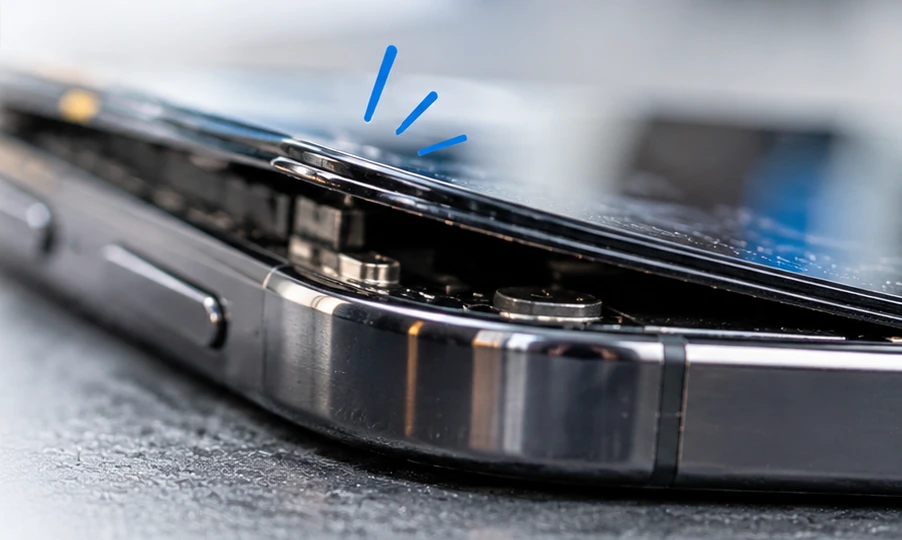
FoneFix Honiton / Phone repair advice
Phone screen lifting?
It might be more than loose adhesive.
A screen or rear glass panel that starts to lift can be caused by failed adhesive, impact damage or a swollen battery. An expanding battery can push against the display or rear glass, creating a visible gap.
- Screen lifting
- Rear glass separating
- Possible battery swelling
Understanding the problem
Why does a phone battery swell?
Most smartphones use lithium-ion batteries. Over time, unwanted chemical reactions can produce gas inside the battery. If that gas builds up, the sealed battery pouch may expand.
01
Gas develops inside the battery
Battery ageing, excessive heat or an internal fault can contribute to unwanted chemical reactions. These reactions may produce gas inside the battery.
02
The battery begins to expand
As gas accumulates, the sealed battery pouch can become thicker. The expansion may be gradual, so the first visible signs can be easy to miss.
03
Pressure builds inside the phone
A swollen battery takes up more space. It may press against the display, rear housing or other components. This pressure can cause panels to lift.
Worth knowing: A swollen battery does not always cause an obvious bulge. Sometimes, the first clue is a small gap along the edge of the screen or rear glass. However, a gap alone does not confirm battery swelling.
Recognising the symptoms
How can you tell if your phone battery is swollen?
Battery swelling isn't always obvious. Some phones develop a noticeable gap, while others show more subtle changes. Here are five warning signs worth checking.
-
01
The screen is lifting from the frame
You may notice a gap along one edge of the display. It might start near a corner or appear along a longer section of the phone.
-
02
The rear glass is separating
The back panel may no longer sit flush against the frame. A gap can appear even when the rear glass itself is not cracked.
-
03
The display looks distorted
Pressure from inside the phone can sometimes affect the display. You might notice an unusual bulge, pressure marks or changes to the way the screen sits.
-
04
The phone no longer sits flat
A distorted housing may cause the phone to rock on a flat surface. However, many phones naturally rock because of their raised camera housing.
-
05
There are unusual battery changes
Unexpected shutdowns, poor battery life or unusual heat can accompany battery faults. These symptoms have several possible causes and do not confirm swelling.
Remember: Not every swollen battery produces all these symptoms. Equally, a phone showing one of these signs may have a different fault. The safest approach is to have the cause assessed.
Keeping your device safe
What should you do if your phone is lifting?
If your screen or rear glass starts separating, don't try to force it back into place. The safest next step depends on whether battery swelling is suspected.
First, stop using and charging the phone.
If a swollen battery is possible, disconnect the charger and switch the phone off if safe. Keep it away from heat and flammable materials. Arrange professional advice before using it again.
✓
What you should do
Keep the phone switched off
Avoid using or charging the device until the cause has been assessed. If it is already switched off, leave it off.
Place it somewhere suitable
If the phone is cool and safe to handle, place it on a stable, non-flammable surface away from combustible items.
Arrange an inspection
Contact an experienced phone repair specialist. Explain that the screen or rear glass is lifting and that battery swelling may be involved.
×
What you should avoid
Don't press the screen down
Forcing the screen or rear glass back into position may damage the battery or other components.
Don't clamp, tape or glue it shut
Holding the housing closed can conceal the problem and put additional pressure on the battery.
Don't attempt to puncture the battery
Never pierce, squeeze, bend or try to flatten a swollen battery. Damaged lithium-ion batteries can catch fire.
What if the phone becomes hot, smokes or hisses?
If the phone becomes extremely hot, starts smoking, hisses or releases fumes, do not handle it. Move away, keep others clear and call 999 if there is a fire or immediate danger. Do not breathe in fumes.
Repair and recovery
Can a swollen phone battery be repaired?
In many cases, a phone with a swollen battery can be repaired. However, the battery itself cannot be safely restored. It needs to be replaced, and the surrounding components must be checked for damage.
Replace the battery. Assess the damage. Protect the phone.
A professional assessment should establish whether the battery has expanded and whether it has affected the screen, rear glass or frame.
Not every lifting screen needs replacing. If the display is undamaged and suitable for refitting, it may be possible to retain it. However, a cracked, distorted or weakened display may need replacement.
What might the repair involve?
Three possible outcomes after inspection
01 / BATTERY
Battery replacement only
If the swelling has not damaged other parts, replacing the battery may be enough to restore the phone to safe working condition.
02 / DISPLAY
Battery and screen repair
If pressure has damaged the display, or the screen cannot be safely refitted, additional screen repair or replacement may be required.
03 / HOUSING
Further damage assessment
The rear glass, frame or internal components may also be affected. In some cases, the repair may not be economical or advisable.
FoneFix Honiton advice: If your screen or rear glass is lifting, don't assume it simply needs new adhesive. We recommend checking the cause before attempting to reseal the phone. Repair options depend on the device model and its condition.
A question worth asking
Is it safe to keep using a phone with a lifting screen?
Don't risk it.
If the screen or rear glass is lifting and you don't know why, it's sensible to stop using the phone until the cause has been checked.
A swollen lithium-ion battery can present a fire risk, particularly if it is damaged, compressed or continues to deteriorate. Charging a device with a suspected swollen battery is especially unwise.
If battery swelling is suspected, switch the phone off if safe and do not charge it again until it has been professionally assessed.
What if it's only loose adhesive? A confirmed adhesive problem is different from battery swelling. However, until the cause is established, don't assume that a lifting screen is harmless. A separated housing may also leave the phone more vulnerable to dust and moisture.
Frequently asked questions
Phone screen lifting and swollen battery FAQs
A lifting screen or rear panel can raise several questions. Here are some straightforward answers to help you understand what might be happening inside your phone.
Does a lifting phone screen always mean the battery is swollen?
No. Screens can lift because of weakened adhesive, previous damage, poor-quality repairs or a distorted frame. However, battery swelling is an important possibility that should be ruled out before the screen is resealed.
Can a swollen battery damage the phone screen?
Yes. An expanding battery can put pressure on the display from underneath. This may cause the screen to lift, distort or become damaged. In some cases, the screen can be retained. In others, replacement may be necessary.
Can a swollen phone battery go back to normal?
No. A physically swollen lithium-ion battery should not be reused, compressed or deliberately discharged in an attempt to restore its shape. The appropriate repair is replacement, where suitable.
Can the screen be glued back down?
Sometimes a screen that has lifted because of adhesive failure can be professionally refitted. However, the underlying cause must be identified first. If the battery is swollen, simply resealing the screen would not resolve the problem.
Will my phone need a new screen and battery?
Not necessarily. The required repair depends on the condition of the display, battery, frame and internal components. An inspection helps establish which parts, if any, need replacing.
Can I bring a phone with a suspected swollen battery into FoneFix Honiton?
Please contact us first so we can advise you on the safest next step. Do not charge or use the device if swelling is suspected. If the phone is hot, smoking, hissing or releasing fumes, do not handle or transport it.
FoneFix Honiton / East Devon
Screen lifting? Let's find out why.
At FoneFix Honiton, we help customers across Honiton and East Devon with phone screen problems, battery faults and device repairs. With over 15 years' experience, we can advise on the next step and available repair options.