
No products in the cart.
Return To Shop
iPhone Battery Guide
Why Is My iPhone Battery Draining So Fast?
Fast battery drain does not always mean the battery itself has failed. Apps, poor signal, background activity, screen brightness, software updates and battery age can all affect how long an iPhone lasts between charges.
Battery health
Check whether the battery has significantly aged.
App activity
See which apps are actually using the most power.
Something else?
Signal, heat, software and settings can all cause drain.
✓
Don't replace the battery just because the phone is draining quickly.
A few simple checks can often show whether the battery is genuinely worn or whether something else is causing the problem.
A few simple checks can often show whether the battery is genuinely worn or whether something else is causing the problem.
Quick Diagnosis
Is it really the battery?
How and when the battery drains can give us some useful clues. See which of these sounds most like what your iPhone is doing.
↓
Battery drops quickly all day
The percentage falls noticeably even with fairly normal use, and you're having to charge much more often than you used to.
Battery health is worth checking
◷
Battery suddenly became worse
Battery life changed dramatically over a short period rather than gradually getting worse over months or years.
Check apps and recent changes first
☾
Large battery loss overnight
The iPhone loses a significant amount of charge while you're asleep, despite barely being used.
Look for background activity
!
Shuts down with charge remaining
The iPhone unexpectedly switches off while the battery indicator still shows charge, particularly under heavier use.
A deteriorated battery is more likely
i
These symptoms aren't a diagnosis on their own. The useful next step is to look at the information your iPhone already provides about its battery. That can help separate a genuinely worn battery from unusually high power usage.
Battery Health
Check the condition of your iPhone battery
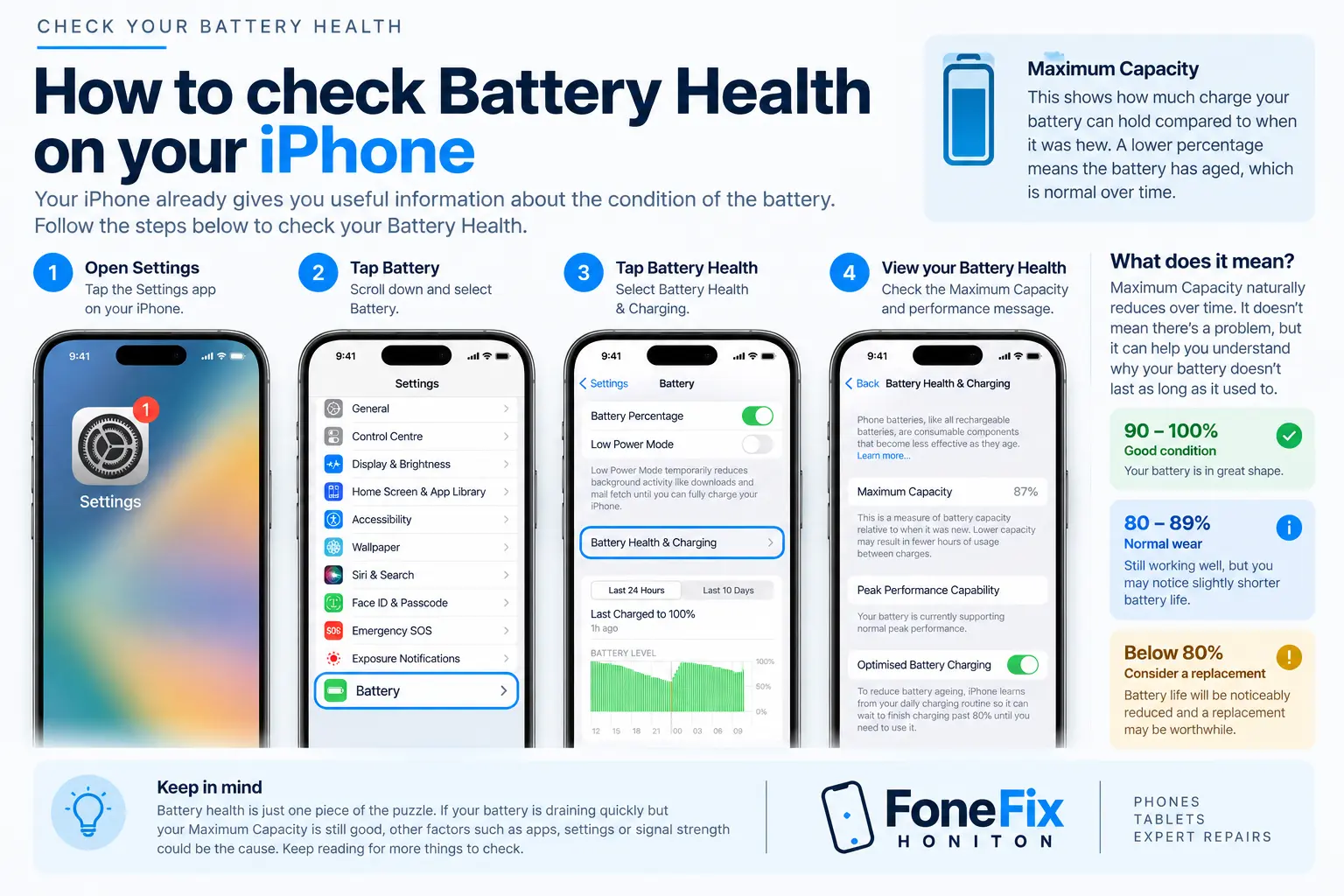
Your iPhone can give you useful information about the condition of its battery. Open Settings → Battery, then look for Battery Health or Battery Health & Charging, depending on your iPhone model and iOS version.
What is Maximum Capacity?
Maximum Capacity compares how much charge the battery can hold now with when it was new. For example, 87% Maximum Capacity means the battery's estimated capacity is lower than when it was new, so some reduction in battery life is to be expected.
Does 80% mean the battery has failed?
Not automatically. Battery capacity gradually reduces as the battery chemically ages. The percentage is useful information, but we also consider real-world battery life, unexpected shutdowns and any battery health warnings.
A good Battery Health percentage doesn't rule out another cause.
If Maximum Capacity still looks healthy but the battery has suddenly started draining much faster, the next place to look is Battery Usage. This can reveal whether a particular app or background process is consuming an unusually large amount of power.
Battery Usage
Find out what's actually using your battery
If your Battery Health still looks reasonable, the next step is to check whether a particular app or background process is using an unusually large amount of power.
Settings
→
Battery
→
Battery Usage
Look at which apps are using the most power
The Battery screen shows how much power different apps have used over the selected period. A high percentage does not automatically mean an app is faulty — it may simply be the app you use most.
Video / Social app
Heavy screen and network use
38%
Maps / Navigation
GPS and screen activity
21%
Messaging
Foreground and background activity
14%
Other apps
Normal mixed usage
27%
What should you look for?
The most useful clues are apps using far more power than expected, especially when you haven't been actively using them.
1
Background Activity
An app may still be working when it isn't open on screen.
2
Unusually high usage
A rarely used app appearing near the top of the list is worth investigating.
3
Recent changes
If the problem started after installing or updating an app, that can be a useful clue.
Don't focus on one percentage alone.
Battery Usage is most useful when you compare it with how you actually use the phone. A navigation app using lots of battery during a long journey is normal; an app using a large amount of power while barely being used is much more interesting.
Other Causes
What else can make an iPhone battery drain quickly?
A healthy battery can still run down quickly if the phone is doing more work than usual. These are some of the most common causes worth checking.
▥
High screen brightness
The display is one of the biggest power users on an iPhone. Very high brightness, long screen-on time and video use can noticeably reduce battery life.
⌁
Poor mobile signal
When reception is weak, the iPhone may work harder to stay connected to the mobile network. Battery drain can be much worse in areas with poor coverage.
◎
Location services
Navigation, fitness and location-aware apps can use GPS regularly. Continuous or unnecessary location access can increase power consumption.
↻
Background activity
Apps can refresh content, sync data and receive updates while you are not actively using them. Heavy background activity may cause unexpected drain.
5G
Heavy mobile data use
Streaming, hotspot use, large downloads and sustained mobile-data activity can all increase battery consumption, particularly when signal strength is poor.
△
Heat and temperature
High temperatures can affect both performance and battery behaviour. Avoid leaving an iPhone in direct sun or a very hot vehicle, particularly while charging.
Battery worse after an iOS update?
For a short period after a major update, your iPhone may carry out background tasks such as indexing photos, files and other data. Battery usage can temporarily be higher while this completes.
For a short period after a major update, your iPhone may carry out background tasks such as indexing photos, files and other data. Battery usage can temporarily be higher while this completes.
A sudden change is more interesting than gradual ageing.
If battery life became dramatically worse overnight, especially after installing an app or changing software, investigate that before assuming the battery itself needs replacing.
If battery life became dramatically worse overnight, especially after installing an app or changing software, investigate that before assuming the battery itself needs replacing.
Battery Replacement
When does an iPhone actually need a new battery?
Battery replacement makes sense when the evidence points towards the battery itself rather than unusually high power usage. These are some of the stronger signs.
↓
Battery life has gradually become poor
If the iPhone used to last most of the day but now needs charging much earlier despite similar use, normal battery ageing may be the cause.
%
Maximum Capacity is significantly reduced
A lower Maximum Capacity means the battery can store less energy than when it was new. The lower it becomes, the more noticeable the loss of runtime is likely to be.
!
Unexpected shutdowns
An ageing battery may struggle to deliver the power required during heavier use, which can contribute to the iPhone switching off unexpectedly.
i
Battery service warning
If iOS reports that the battery's health is significantly degraded or recommends service, that is a strong indication that replacement should be considered.
Battery percentage alone doesn't tell the whole story
We don't recommend replacing an iPhone battery just because it has crossed a particular percentage. Battery Health, symptoms, usage patterns and any iOS warnings should be considered together. If the battery still performs well enough for how you use the phone, there may be no urgent reason to replace it.
Think your iPhone battery may need replacing?
FoneFix Honiton can check the symptoms and help establish whether a battery replacement is actually the right repair before parts are fitted.
Frequently Asked Questions
Common questions about iPhone battery drain
Quick answers to the questions we hear most often. Tap a question to see the answer.
Still not sure?
If the symptoms don't match what you're seeing in Battery Health or Battery Usage, FoneFix Honiton can help diagnose the problem.
☾ Why is my iPhone battery draining even when I'm not using it?
Apps can still use power in the background for syncing, location, notifications and other activity. Poor mobile signal can also increase power usage even while the phone appears idle.
% Is 80% Battery Health bad?
It means the battery can hold noticeably less charge than when it was new, but it doesn't automatically mean it must be replaced immediately. Actual battery life, unexpected shutdowns and any iOS service warnings matter too.
↻ Can an iOS update cause battery drain?
Battery usage can temporarily increase after a major update while the iPhone completes background tasks. If unusually high drain continues, check Battery Usage for apps or processes consuming more power than expected.
▥ Will replacing the battery make my iPhone last longer?
If poor battery life is genuinely being caused by an aged or degraded battery, replacement can restore much of the lost runtime. If the drain is being caused by software, signal, apps or heavy usage, a new battery may not solve the underlying problem.
Need more help?
We can check the iPhone, review the battery information and help determine whether a battery replacement is actually the right solution.
Check Battery Repair Options